

Approving an action
What stopped, and why
Section titled “What stopped, and why”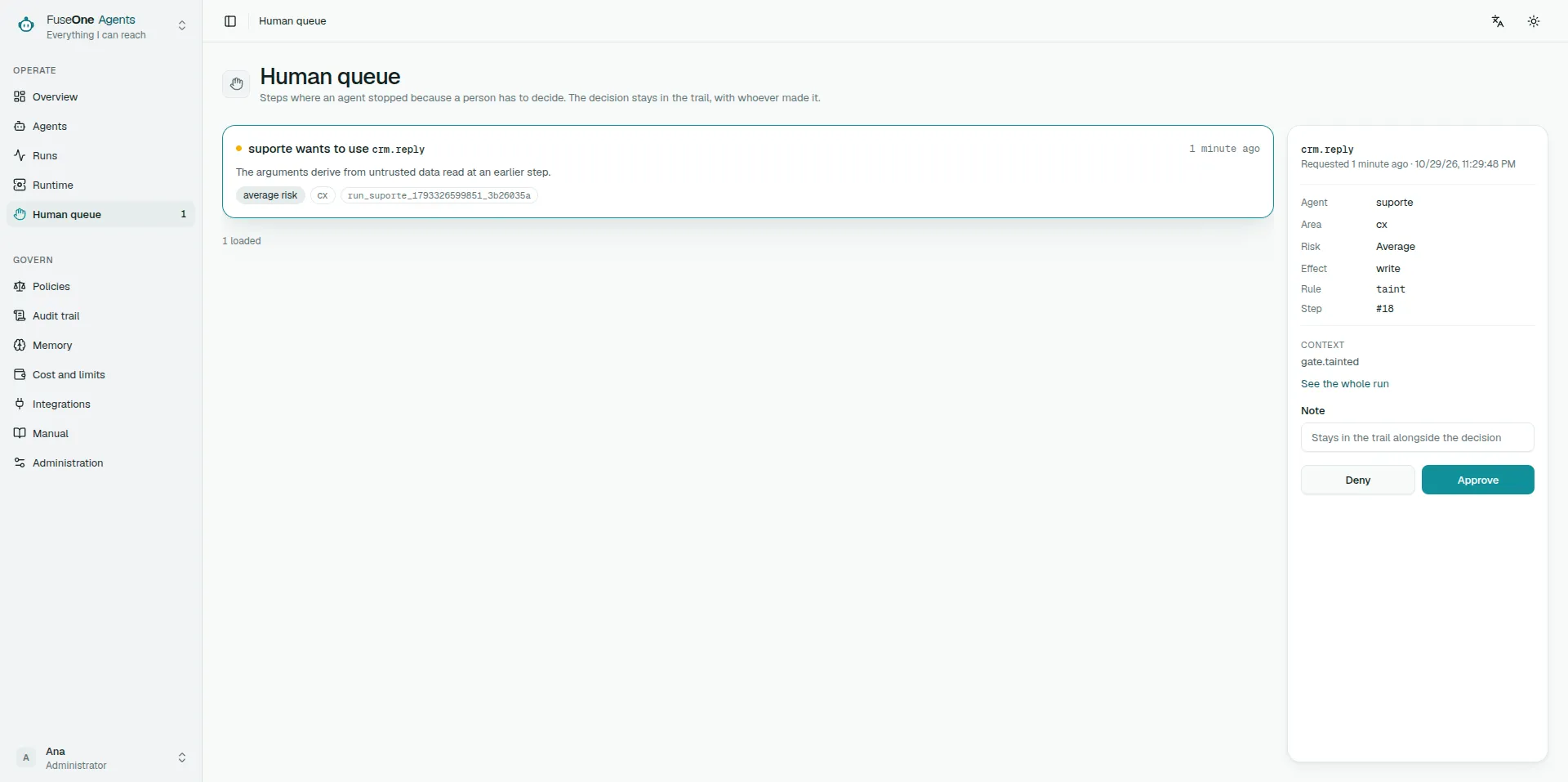
When a run stops it appears in the human queue. The screen shows three things, and the first is the one that matters:
The exact arguments that will be sent. Not a description of what the agent intends to do — the real content of the call.
The rule that stopped it. It may be the effect ladder, the mark carried by content from outside, or a policy with its code and reason.
What the run did up to that point. The whole trail, so you understand the path and not only the last step.
Where you are asked
Section titled “Where you are asked”An approval always exists in the console — that is where the human queue lives, and nothing in this section changes it. What the agent’s owner chooses is whether it also arrives as a direct message from the Slack bot.
Tick “Also send it as a direct message from the bot” on the agent, under Governance. Naming nobody, it reaches the people holding Approver in a scope covering the run. Naming people, it reaches those — among the ones who may already decide.
Naming is addressing, not authorising. The button is checked against the run’s own scope wherever it is pressed, so naming somebody without the grant gives them nothing: they are dropped from the list, and it is recorded that the agent’s list reaches nobody who can decide.
The choice is versioned with the agent. A run obeys what the version it pinned asked for — changing the agent today does not change how yesterday’s run is announced.
Three things must exist for the message to go out: a channel connection, the
Slack app’s im:write scope, and the person’s linked account. Anybody unlinked
is simply not reached, and the reason is recorded.
If the installation has more than one connection and the run is in no area with a configured conversation, nothing is sent: there is no way to know which workspace to speak from, and guessing would send one company’s run into another company’s Slack. Configure a conversation for that scope, or leave one connection enabled.
Approving releases that call
Section titled “Approving releases that call”An approval covers that call, with those arguments. It does not switch the tool on, does not carry to next time, does not create an exception. The next run stops again.
Which is why reading the arguments is the work, not a formality. The question is not “is this agent trustworthy?” — it is “should this specific call happen?”.
When the right answer is not to approve
Section titled “When the right answer is not to approve”Approving the same thing ten times in a row is a signal, not a routine. It means the area’s policy is wrong — either because it stops something that should pass, or because whoever approves has stopped deciding.
Either way the fix is the policy, not the click.
The reverse holds too: if a call surprised you, refuse it and go read the agent’s instruction. Refusing is not punishing the agent — it is the mechanism saying something was not anticipated.
Refusing is information
Section titled “Refusing is information”A refusal is recorded with whoever decided. If the run can continue without that action it continues; if it cannot, it stops with the refusal in its trail.
Whoever wrote the agent sees that and learns what the real world brought that the rehearsal did not.
Use cases
Section titled “Use cases”The content came from a ticket
Section titled “The content came from a ticket”A run read a ticket’s text and now wants to write. It stopped, because anything from outside carries a mark.
What to look at: whether what will be written reflects the ticket, or reflects something the ticket’s text asked the agent to do. The second is an instruction attempting to arrive inside content, and the answer is to refuse.
For a governed Gravitee ticket, also verify the fixed evidence panel: the subscription, application owner, API, plan, current status and requested expiration. Acceptance is refused if the remote snapshot changes after this panel was produced. The API key itself is deliberately absent; it is retrieved from Gravitee after acceptance, never from the approval card.
If the ticket later says Manual verification required, do not approve, retry or issue another key. Inspect that subscription in Gravitee. FuseOne keeps the original execution claim and continues observing it with reads; once the remote outcome is provable, the same Slack thread receives the confirmed answer.
The agent wants to delete something
Section titled “The agent wants to delete something”A destructive effect is blocked by default. If it reached you, somebody opened it by policy.
What to look at: the exact target in the arguments. Destructive is the one category where approving cannot be undone afterwards.
You do not understand the call
Section titled “You do not understand the call”Refuse. An approval you cannot explain is not an approval — it is a signature.
What the platform stops on its own is in What the platform stops before it happens, and how to write the rule that changes it is in Policies.